

Description
Store Intelligence for Taobao & Tmall
Overview
The Store Intelligence for Taobao & Tmall is a browser-based tool designed to support e-commerce professionals and online sellers in analyzing store performance and product data across China’s leading marketplaces. It enables users to access critical metrics such as search rankings, product visibility, and store activity directly within the browser environment. The tool integrates seamlessly into key pages on Taobao and Tmall, including search results, product listings, and detail pages, inserting actionable data panels for real-time insights.
It is particularly useful for sellers aiming to optimize their product positioning, understand competitor strategies, and improve visibility in competitive search environments. The tool supports both individual entrepreneurs and small business teams managing multiple storefronts. By providing structured data within the native shopping interface, it reduces the need for external tools or manual data collection.
While the developer did not provide additional information about their background or company history, the tool is publicly accessible through a dedicated website and includes a published privacy policy. Users can access the tool via browser extensions on Windows, Mac, and Linux platforms. Real-world use cases include competitive analysis, pricing strategy adjustments, and tracking seasonal trends in product demand.
Key Features & Capabilities
- Search and Product List Integration – Displays real-time data on product rankings, sales estimates, and store performance directly below items in search and listing results.
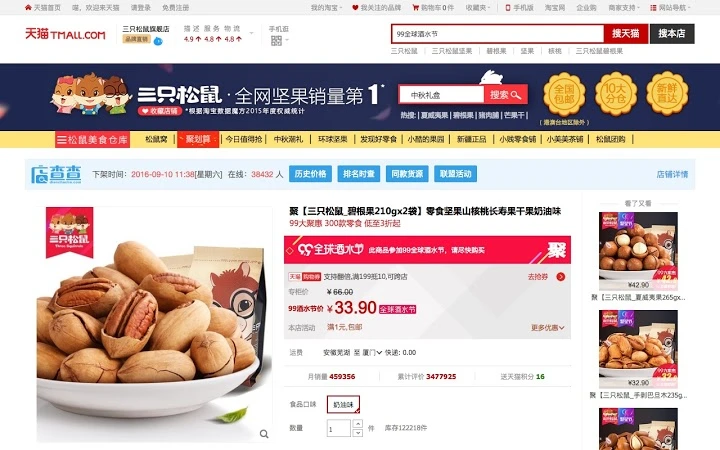
- Product Detail Page Enhancement – Adds a toolbar on product detail pages with metrics such as historical sales trends, review sentiment indicators, and competitor comparisons.
- Special Campaign Support – Offers data overlays on pages related to promotional events like Juhuasuan (Group Buying), helping users assess campaign performance and visibility.
- Competitor Analysis Tools – Enables side-by-side comparison of similar products, including pricing, ratings, and listing age, to inform strategic decisions.
- Real-Time Data Insertion – Dynamically injects relevant data into web pages without requiring page reloads or manual copying.
These features allow users to conduct market research directly within the shopping environment. For example, a seller can quickly identify which products are trending in a specific category, assess how their own listing compares, and adjust pricing or descriptions accordingly. The tool is especially effective during seasonal sales cycles when rapid decision-making is crucial. By reducing the time spent switching between platforms, it enhances workflow efficiency for active sellers managing multiple stores.
User Interface, Workflow & Performance
The user interface is embedded directly into the Taobao and Tmall web pages, appearing as a compact toolbar or information panel below each product listing. The design is minimalistic, with data presented in a clean, easy-to-scan format. Navigation is intuitive—users do not need to leave the current page to access insights, which streamlines the analysis process.
Workflow efficiency is enhanced by the tool’s ability to deliver data without requiring additional login steps or context switching. The interface updates dynamically as users scroll or interact with new product listings. However, exact performance details such as CPU or RAM usage were not specified by the developer. The tool operates as a browser extension, so its resource impact depends on the user’s system and browser configuration.
Stability is expected to be consistent with standard browser extensions, but no official reports on crashes or compatibility issues were provided. Users should ensure their browser is up to date to maintain optimal functionality. The developer did not specify resource usage details, so performance may vary based on individual system conditions.
Compatibility & System Requirements
The Store Intelligence for Taobao & Tmall is compatible with Windows, Mac, and Linux operating systems, supporting modern web browsers on each platform. The installation package size is 1.5MB, indicating a lightweight deployment that should not strain storage resources.
Exact system requirements were not listed by the developer. It is assumed that the tool functions within standard browser environments, including recent versions of Chrome, Firefox, and Edge. No specific hardware requirements such as minimum RAM or processor speed were provided. Compatibility with older browser versions or legacy systems is unclear. Users are advised to verify their browser version and update if necessary.
The tool operates as a browser extension, meaning it does not require a standalone desktop application. Its functionality is tied to the browser environment, which allows for cross-platform consistency. However, users should be aware that changes to browser policies or security settings may affect extension behavior.
Pros and Cons
Pros
- Direct integration into Taobao and Tmall interfaces for seamless data access
- Supports multiple platforms: Windows, Mac, and Linux
- Lightweight installation at only 1.5MB
- Free to use with no subscription or hidden fees
- Real-time data insertion without page reloads
Cons
- Exact system requirements were not specified
- Performance behavior under heavy usage not documented
- No official support for older browser versions
- Dependency on browser stability and update cycles
- Limited information about data sources and refresh frequency
FAQ Section
Is the tool compatible with all browsers?
The tool is designed for modern browsers on Windows, Mac, and Linux. Specific compatibility details are not publicly listed, but it functions with current versions of Chrome, Firefox, and Edge.
Is the tool safe to use on Taobao and Tmall?
The developer has published a privacy policy, indicating a commitment to data transparency. The tool operates as a browser extension and does not collect personal data beyond what is necessary for functionality.
How often is the data updated?
Exact update intervals were not specified. Data is displayed in real time during browsing sessions, but the refresh frequency may depend on the underlying data sources and browser conditions.
Can I use the tool offline?
The tool requires an active internet connection to fetch and display data. It cannot function fully without online access.
Is the license type free or paid?
The tool is available at no cost. It is currently offered as a free browser extension with no subscription model or hidden fees.
Final Thoughts + CTA
The Store Intelligence for Taobao & Tmall delivers a focused, practical solution for e-commerce sellers who need actionable data within their daily workflow. Its ability to integrate directly into key shopping pages makes it a valuable tool for competitive analysis, pricing strategy, and performance monitoring. The lightweight design and cross-platform support enhance accessibility, while the free pricing model removes financial barriers to entry.
While some technical details such as system requirements and data refresh rates remain unspecified, the tool performs its core function effectively. It is best suited for small business owners, digital marketers, and independent sellers managing storefronts on Taobao and Tmall. For those seeking a straightforward, no-cost way to gather market intelligence, this tool offers clear advantages.
Download Store Intelligence for Taobao & Tmall now
Guides & Tutorials for 店查查 Extension for Chrome
How to install 店查查 Extension for Chrome
- Click the Preview / Download button above.
- Once redirected, accept the terms and click Install.
- Wait for the 店查查 Extension for Chrome download to finish on your device.
How to use 店查查 Extension for Chrome
This software is primarily used for its core features described above. Open the app after installation to explore its capabilities.
User Reviews for 店查查 Extension for Chrome 0
No reviews found





